Difference between revisions of "Tip Jar Ranges & Features"
(→Professional Tip Jars) |
(→Support Issues) |
||
| (2 intermediate revisions by the same user not shown) | |||
| Line 29: | Line 29: | ||
::::::::: [[Rez N Go Tip Jar Range|'''View Tip Jar Instructions''']]<br clear=all> | ::::::::: [[Rez N Go Tip Jar Range|'''View Tip Jar Instructions''']]<br clear=all> | ||
| − | [[#top|[Top]]] | + | <span style="font-size:x-small">''[[#top|[Top]]]''</span> |
---- | ---- | ||
| Line 40: | Line 40: | ||
<br clear=all> | <br clear=all> | ||
| − | [[#top|[Top]]] | + | <span style="font-size:x-small">''[[#top|[Top]]]''</span> |
---- | ---- | ||
| Line 64: | Line 64: | ||
::::::::: [[Ultimate Tip Jar Range|'''View Tip Jar Instructions''']] | ::::::::: [[Ultimate Tip Jar Range|'''View Tip Jar Instructions''']] | ||
| − | [[#top|[Top]]] | + | <span style="font-size:x-small">''[[#top|[Top]]]''</span> |
---- | ---- | ||
| Line 74: | Line 74: | ||
::::::::: [[Live Act Info Tip Jar|'''View Tip Jar Instructions''']] | ::::::::: [[Live Act Info Tip Jar|'''View Tip Jar Instructions''']] | ||
<br clear=all> | <br clear=all> | ||
| − | [[#top|[Top]]] | + | <span style="font-size:x-small">''[[#top|[Top]]]''</span> |
---- | ---- | ||
| Line 84: | Line 84: | ||
::::::::: [[Live Act Web Tip Jar|'''View Tip Jar Instructions''']] | ::::::::: [[Live Act Web Tip Jar|'''View Tip Jar Instructions''']] | ||
<br clear=all> | <br clear=all> | ||
| − | [[#top|[Top]]] | + | <span style="font-size:x-small">''[[#top|[Top]]]''</span> |
---- | ---- | ||
<br clear=all> | <br clear=all> | ||
| Line 93: | Line 93: | ||
[[File:tick.png|40px|link=|]]'Easy View' Info Buttons*[[File:tick.png|40px|link=|]]Slide-Show Display*[[File:tick.png|40px|link=|]]Bot Compatible - Auto group invites**[[File:tick.png|40px|link=|]]Menu Driven | [[File:tick.png|40px|link=|]]'Easy View' Info Buttons*[[File:tick.png|40px|link=|]]Slide-Show Display*[[File:tick.png|40px|link=|]]Bot Compatible - Auto group invites**[[File:tick.png|40px|link=|]]Menu Driven | ||
[[File:tick.png|40px|link=|]]Display the music tracks from a SHOUTcast stream [[File:tick.png|40px|link=|]]Announce in local the current track from a SHOUTcast stream[[File:tick.png|40px|link=|]]Link to a website[[File:tick.png|40px|link=|]]Hand out Landmarks, Note-cards or Gift. <span class="small">''(Any two of these)''</span>[[File:tick.png|40px|link=|]]Turn on and off Rotation[[File:tick.png|40px|link=|]]Choose your tip jars name[[File:tick.png|40px|link=|]]Uses any texture you wish*[[File:tick.png|40px|link=|]]Plays choice of 6 particle effects when tipped[[File:tick.png|40px|link=|]]Full stats on the tips received[[File:tick.png|40px|link=|]]Full stats on group requests & items given[[File:tick.png|40px|link=|]]Change hover text colour[[File:tick.png|40px|link=|]]Split tips option[[File:tick.png|40px|link=|]]Select what tip info is displayed[[File:tick.png|40px|link=|]]Ready to use - Just "Rez 'N Go"![[File:tick.png|40px|link=|]]Simple "Touch For Help" system[[File:tick.png|40px|link=|]]Auto-Update system | [[File:tick.png|40px|link=|]]Display the music tracks from a SHOUTcast stream [[File:tick.png|40px|link=|]]Announce in local the current track from a SHOUTcast stream[[File:tick.png|40px|link=|]]Link to a website[[File:tick.png|40px|link=|]]Hand out Landmarks, Note-cards or Gift. <span class="small">''(Any two of these)''</span>[[File:tick.png|40px|link=|]]Turn on and off Rotation[[File:tick.png|40px|link=|]]Choose your tip jars name[[File:tick.png|40px|link=|]]Uses any texture you wish*[[File:tick.png|40px|link=|]]Plays choice of 6 particle effects when tipped[[File:tick.png|40px|link=|]]Full stats on the tips received[[File:tick.png|40px|link=|]]Full stats on group requests & items given[[File:tick.png|40px|link=|]]Change hover text colour[[File:tick.png|40px|link=|]]Split tips option[[File:tick.png|40px|link=|]]Select what tip info is displayed[[File:tick.png|40px|link=|]]Ready to use - Just "Rez 'N Go"![[File:tick.png|40px|link=|]]Simple "Touch For Help" system[[File:tick.png|40px|link=|]]Auto-Update system | ||
| − | ::::::::: [[Club Tip Jar Range|'''View Tip Jar Instructions''']] | + | ::::::::: [[Club Tip Jar Range|'''View Tip Jar Instructions''']]<br clear=all> |
| − | [[#top|[Top]]] | + | <span style="font-size:x-small">''[[#top|[Top]]]''</span> |
---- | ---- | ||
<br clear=all> | <br clear=all> | ||
| Line 110: | Line 110: | ||
==Support Issues== | ==Support Issues== | ||
| − | + | ||
'''Have you got a question or a problem with one of our products?''' | '''Have you got a question or a problem with one of our products?''' | ||
<div class="bump"> | <div class="bump"> | ||
| Line 117: | Line 117: | ||
* Please use our [http://support.marcuszenoria.com Product Support] page to report a problem or ask a question | * Please use our [http://support.marcuszenoria.com Product Support] page to report a problem or ask a question | ||
*:''We will contact you with a fix or a replacement product as soon as possible.'' | *:''We will contact you with a fix or a replacement product as soon as possible.'' | ||
| − | + | ::::::::::::::::::::: '''[http://support.marcuszenoria.com Product Support >>>]'''</div> | |
| − | <div class="top">[[#top|[Top]]] | + | <div class="top">[[#top|[Top]]]</div> |
---- | ---- | ||
| + | [[File:SUPPORT.png|link=http://support.marcuszenoria.com|left|140px|alt=Our Guarantee]][[File:LIFETIME_UPDATES.png|link=http://support.marcuszenoria.com|right|140px|alt=Our Guarantee]] | ||
Latest revision as of 13:09, 13 July 2017
Tip Jars for all requirements
- We have 4 versions of Tip Jars for use by single users (Avi's):
- We have special versions of Jars for Live Performers and Artists:
- We also have a version designed especially for Clubs and Sims, for multi-users (Avi's):
See below for a feature list of each of our ranges, and links to the online documentation:
Rez 'N Go Tip Jars
 Choose your tip jars nameUses your profile picture*Plays L$ particle effect when tip receivedReady to use - Just "Rez 'N Go"!Simple "Touch For Help"Auto-Update system system
Simple Tip Jars
Choose your tip jars nameUses any texture you wish*Plays choice of 6 particle effects when tippedMenu DrivenFull stats on the tips receivedTurn on and off RotationChange hover text colourSelect what tip info is displayedReady to use - Just "Rez 'N Go"!Simple "Touch For Help" systemAuto-Update system

Professional Tip Jars
Personalise tip messagesSend a private message to tipperGroup Joiner ButtonLink to a website
Hand out Landmarks, Note-cards or Gift. (Any two of these)Menu DrivenChoose your tip jars nameUses any texture you wish*Plays choice of 6 particle effects when tippedFull stats on the tips receivedFull stats on group requests & items givenTurn on and off RotationChange hover text colourSelect what tip info is displayedReady to use - Just "Rez 'N Go"!Simple "Touch For Help" systemAuto-Update system system

Ultimate Tip Jars
DJ Request systemPersonalise tip messagesSend a private message to tipperGroup Joiner Button
'Easy View' Info Buttons*Slide-Show Display*Bot Compatible - Auto group invites**Menu DrivenDisplay the music tracks from a SHOUTcast stream Announce in local the current track from a SHOUTcast streamLink to a websiteHand out Landmarks, Note-cards or Gift. (Any two of these)Turn on and off RotationChoose your tip jars nameUses any texture you wish*Plays choice of 6 particle effects when tippedFull stats on the tips receivedFull stats on group requests & items givenChange hover text colour
Select what tip info is displayedReady to use - Just "Rez 'N Go"!Simple "Touch For Help" systemAuto-Update system

Live Act Info Tip Jar
10 Built in Eye-Catching DesignsEasy-View buttons for Song List, Schedule, Biography and Group JoinerPersonalise tip messagesSend a private message to tipperSlide-Show DisplayMenu DrivenBot Compatible - Auto group invitesTurn on and off RotationUses any texture you wishFull stats on the tips receivedChoose your tip jars namePlays choice of 6 particle effects when tippedFull stats on group requests & items givenChange hover text colourSplit tips option to share earnings between up to 10 peopleSelect what tip info is displayedReady to use - Just "Rez 'N Go"!Simple "Touch For Help" systemAuto-Update system

Live Act Web Tip Jar
10 Built in Eye-Catching DesignsEasy-View buttons for Song List, Schedule, Biography and Group Joiner'Web-View' buttons for your personal Website, YouTube, FaceBook and Twitter pages*Personalise tip messagesSend a private message to tipperSlide-Show DisplayBot Compatible - Auto group invitesMenu DrivenTurn on and off RotationChoose your tip jars nameUses any texture you wishFull stats on the tips receivedPlays choice of 6 particle effects when tippedFull stats on group requests & items givenChange hover text colourSplit tips option to share earnings between up to 10 peopleSelect what tip info is displayedReady to use - Just "Rez 'N Go"!Simple "Touch For Help" systemAuto-Update system
Club Tip Jars
DJ Request systemPersonalise tip messagesSend a private message to tipperGroup Joiner Button
'Easy View' Info Buttons*Slide-Show Display*Bot Compatible - Auto group invites**Menu Driven
Display the music tracks from a SHOUTcast stream Announce in local the current track from a SHOUTcast streamLink to a websiteHand out Landmarks, Note-cards or Gift. (Any two of these)Turn on and off RotationChoose your tip jars nameUses any texture you wish*Plays choice of 6 particle effects when tippedFull stats on the tips receivedFull stats on group requests & items givenChange hover text colourSplit tips optionSelect what tip info is displayedReady to use - Just "Rez 'N Go"!Simple "Touch For Help" systemAuto-Update system
- * Feature is design dependant, see individual jars before you buy
- ** Works with Smartbots, Metabolt & Pikkubot
- * Feature is design dependant, see individual jars before you buy
Compare Our Ranges
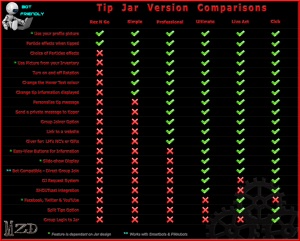
We supply a variety of tip jar types, because everyone needs something different to work with. Some have only the most basic of features, some come with all the "bells & whistles"!
Please take the time to compare our ranges before you buy, and of course, if you have any questions, please don't hesitate to Contact Us.
For a comparison of our ranges, see our comparisons page.
Support Issues
Have you got a question or a problem with one of our products?
- Then we need to hear from you!
- Product problems are bad for business, and we value your business!
- Please use our Product Support page to report a problem or ask a question
- We will contact you with a fix or a replacement product as soon as possible.